QUADRO manual
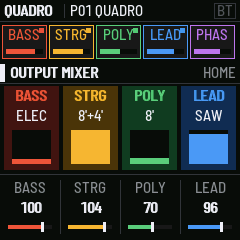
QUADRO turns the M-VAVE FM-1 into a four-section performance synthesizer, after the ARP Quadra (1978). It has a bass, a string ensemble, a poly synth and a two-voice lead, plus a phase shifter, a mixer, a reverb and a delay. They all play at once and share the keyboard.
The sections
| Section | What it is |
|---|---|
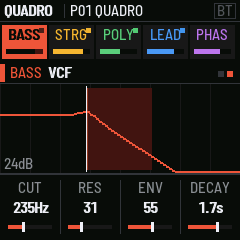
| BASS | A monophonic bass on the keys below the split, lowest note wins. ELEC BASS 16' and 8' squares through a 24 dB filter with a decay envelope. STRING BASS 16' and 8' goes through the string ensemble. |
| STRINGS | Divide-down string voices at 8' and 4', with the three-phase ensemble chorus and an attack/release envelope. |
| POLY | A polyphonic synth: 8' and 4' (or HOLLOW), a 24 dB filter, ADSR, LFO, tremolo. PARA makes it paraphonic, with one envelope and one filter for all keys, as on the original. |
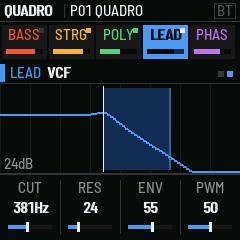
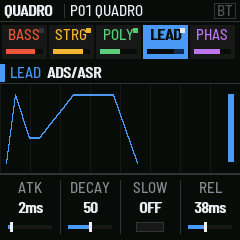
| LEAD | A two-oscillator monosynth on the top key. It has its own filter, ADS/ASR, portamento on each oscillator, vibrato, trill, two-voice mode and the sequencer. |
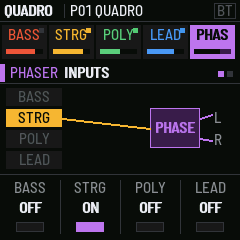
| PHASER | A 14-stage phase shifter. Each section can be routed into it. The sweep runs by itself, by sample-and-hold, from the envelope or from the LFO. |
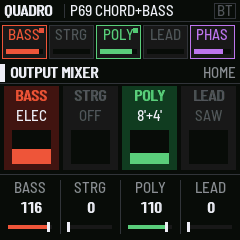
| MIXER | The four section levels, the reverb, and a ping-pong delay that follows MIDI clock. |
The bass plays an octave higher than the original's, because the FM-1's keys start at F3 and its speaker can't reproduce 40–90 Hz. Set BASS OCTAVE to −1 for the original register on headphones.
The controls
| Control | What it does |
|---|---|
| ALGO knob | Picks the section: BASS, STRINGS, POLY, LEAD, PHASER, MIXER |
| SEQ | Next section |
| EDIT | The section's sound (voices, VCO, VCF). Press again for the next page. |
| ENV | The section's envelope |
| LFO | The section's modulation (lead: vibrato, trill, touch) |
| SEL | The keyboard: split, chord, chord bass, lead octave; for the lead, glide and trigger |
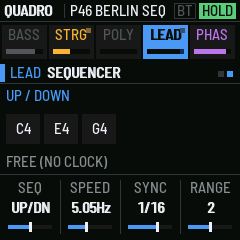
| ARP | The lead's sequencer |
| FX | The phase shifter: inputs, then sweep |
| GLO | The output mixer, then the room (reverb, delay, delay time) |
| HOME | The four sections at a glance, with knobs 1–4 as their levels. Hold it for SETUP. |
| PRESET knob | Loads a program, 1–68 (the list) |
| SAVE | Saves the current sound: PRESET picks the slot, SAVE again writes, any other button cancels |
| PLAY | HOLD: the keys stay down, like the original's HOLD footswitch |
| REC | SUSTAIN: the longest release |
| OCT− / OCT+ | Keyboard octave. Press both to go back to 0. |
| SELECT knob | Phaser sweep speed, always: a performance knob |
| KNOB 1–4 | The four columns of the page on screen |
| MASTER | Volume |
The screen shows, from the top: the program and the latches (SUS, HOLD, clock tempo, BT, octave); the five sections, each lit while it sounds, with its level; the page and a picture of what it sets; and the four knobs. Turning a knob shows the parameter's full name and value.
Playing
- Split. When a bass voice is on, keys below SPLIT play the bass, and the strings, poly and lead play above it. The lead always takes the top key held.
- Chords. CHORD (SEL page) plays a whole shape from one key on the strings and poly: MAJ, MIN, 7, MIN7, MAJ7, SUS4, 5TH, STACK or MIN9. CH BASS adds the chord's root on the bass, an octave down.
- Paraphonic. PARA gives the strings and poly one shared envelope and filter. Each new key restarts it.
- Touch. The FM-1's keys sense pressure. On the lead, TOUCH is BEND (pressure bends up) or BRILL (pressure opens the filter). SETUP > TOUCH sets how much it responds: 0 is off, 1 needs the hardest press, 6 the lightest (2 by default).
- Sequencer. The lead runs UP, UP/DN, DOWN or RAND over the keys held, across 1–3 octaves. PLAY (HOLD) keeps it running hands-free. Without a clock it runs at SPEED; with MIDI clock it locks to SYNC (1/4 to 1/32, with triplets).
SETUP
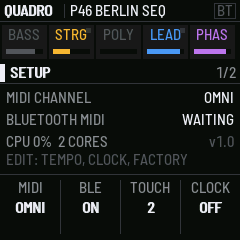
Hold HOME. Press EDIT to switch between the two pages. Press HOME to leave.
| Page | Knob 1 | Knob 2 | Knob 3 | Knob 4 |
|---|---|---|---|---|
| 1 | MIDI channel (OMNI, 1–16) | Bluetooth MIDI on/off | TOUCH: 0 off, 1 (least) – 6 (most sensitive) | CLOCK OUT on/off |
| 2 | TEMPO (internal clock) | RUN: START / STOP | — | FACT: turn twice to restore the 68 factory programs |
MIDI
QUADRO takes MIDI over USB, Bluetooth and the TRS jack, on the SETUP channel (OMNI by default).
| In | Does |
|---|---|
| Note on / off | Plays, as the keys do |
| Pitch bend | ±2 semitones |
| CC 1 (mod wheel) | Lead vibrato |
| CC 64 | Sustain |
| CC 74 | The current section's filter cutoff |
| Channel pressure | The lead's TOUCH |
| Program change 0–67 | Programs 1–68 |
| Clock, start, stop, continue | The sequencer, trill and delay follow it. The header shows the tempo. |
Out: the keys you play go out as notes with velocity, over USB and Bluetooth. With CLOCK OUT on, QUADRO sends MIDI clock at TEMPO, and RUN sends start and stop. An incoming clock always wins over the internal one.
Bluetooth MIDI: connect from your computer's or app's Bluetooth MIDI settings. BT in the header lights once a device has connected. SETUP > BLE turns Bluetooth off, and the setting is kept.
Saving
Programs and settings are kept in the FM-1's flash. SAVE stores the current sound in a program slot. MIDI channel, Bluetooth, touch, clock and tempo are saved with them.
When you update from a 0.x test build, your settings are kept and the 68 factory programs replace the old ones.